AutoMapper - Property/Field Filtering
By default Automapper will try to map not only public properties but also public fields found in source and destination.
using System;
using AutoMapper;

namespace AutoMapperSamples.Configuration
{
    namespace AutoMapperSample
    {

        public class ModelData
        {
            public string Name { get; set; }
            public DateTime StartedOn { get; set; }

            public string Location;
        }


        public class ViewModel
        {
            public string Name { get; set; }
            public DateTime StartedOn { get; set; }

            public string Location;
        }


        public class TestAutoMapper
        {

            public static void Main()
            {
                var config = new MapperConfiguration(cfg =>
                {
                    cfg.CreateMap<ModelData, ViewModel>();
                });

                config.AssertConfigurationIsValid();

                var model = new ModelData { StartedOn = DateTime.Now, Name = "Bridge Construction", Location = "India" };

                var viewModel = config.CreateMapper().Map<viewmodel>(model);
                Console.WriteLine("\nName " + viewModel.Name);
                Console.WriteLine("\nStart Date " + viewModel.StartedOn);
                Console.WriteLine("\nLocation " + viewModel.Location);


                Console.ReadKey();
            }
        }
    }
}
In this example Location is a public field and it will also get mapped automatically.
Output
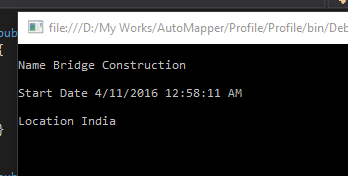
So if you want to ignore the fields from getting mapped, change the configuration settings as follows
var config = new MapperConfiguration(cfg =>
 {
     cfg.ShouldMapField = f => false;
     cfg.CreateMap<ModelData, ViewModel>();
 });
If you want to ignore properties then
var config = new MapperConfiguration(cfg =>
{
     cfg.ShouldMapProperty= f => false;
     cfg.CreateMap<ModelData, ViewModel>();
});
If you want include private properties in the mapping then
var config = new MapperConfiguration(cfg =>
{
    cfg.ShouldMapProperty = pi =>
       pi.GetMethod != null && (pi.GetMethod.IsPublic || pi.GetMethod.IsPrivate);

     cfg.CreateMap<ModelData, ViewModel>();
  });
No Comments
Connecting Azure Blob Storage account using Managed Identity
Posted 12/9/2022Securing Azure KeyVault connections using Managed Identity
Posted 11/26/2022Manage application settings with Azure KeyVault
Posted 11/9/2022Adding Serilog to Azure Functions created using .NET 5
Posted 4/3/2021Learn how to split log data into different tables using Serilog in ASP.NET Core
Posted 4/23/2020